Medical transcription plays a key role in accurate medical documentation. With support from reliable EHR integrated medical transcription services, physicians can save valuable time to focus on providing better patient care. According to a report from Technavio, the medical transcription market has the potential to grow by USD 23.03 billion during 2021-2025, and the market’s growth momentum will slow down at a CAGR of 6.40%. The estimated year-over-year growth rate of 2021 is 8.97%. The industry is also expected to be impacted by the spread of COVID-19 pandemic and predicted to take more than two quarters (six months) to reach a normal state of economic activity. In the short term, the market is expected to show growth due to the increase in infections and reduced economic activity.
Key factors driving the medical transcription market growth are –
Increase in need for automated transcripts, and
Emergence of voice recognition technologies
However, increase in medical data privacy concerns is an important factor that may impede market growth.
The report divides the market by end-user and geography. End users of this market are – hospitals and physician groups and clinics. Region-wise, the market is divided into North America, APAC (Asia-Pacific), Europe, South America, and MEA. 35% of the market’s growth will originate from APAC during the forecast period. Japan is the key market for medical transcription in APAC. APAC has been recording a significant growth rate and is expected to offer several growth opportunities to market vendors during the forecast period, owing to factors such as increasing chronic diseases and aging population.
The report also provides information on several market vendors, including 3M Co., Acusis LLC, CareCloud Inc., Excel Transcriptions Inc., Global Medical Transcription LLC, iMedX Inc., Lingual Consultancy Services Pvt. Ltd., Nuance Communications Inc., and World Wide Dictation Service of New York Inc. among others. The market is fragmented and the vendors are deploying various organic and inorganic growth strategies to compete in the market. To make the most of the opportunities and recover from post COVID-19 impact, these vendors are advised to focus more on the growth prospects in the fast-growing segments, while maintaining their positions in the slow-growing segments.
Hospitals and other providers can consider outsourcing medical transcription tasks to reduce costs and improve the quality of medical documentation. Many practices now rely on transcription software to get automated transcripts within short turnaround time. Though such software has easy voice capture and speech recognition capabilities, the accuracy of the transcripts may be compromised. To ensure better accuracy, practices can consider hiring the services provided by editors in professional medical transcription companies.
At MOS Medical Transcription Services, we provide transcription to healthcare clients across the United States and worldwide. Our team has several years of extensive experience in multi-specialty transcription. All transcripts are checked by our QA team to make sure that the quality of the work is always maintained.
Electronic Health Records (EHRs) were introduced with the objective of standardizing patient data and ensuring better access to it. The process of EHR documentation is simple and easy – just click, input data and save. However, in reality, users don’t find EHR documentation quick and easy. With EHR system, physicians are forced to spend their valuable time on the computer capturing patient’s medical information and tend to miss out opportunities to engage with patients during the office visit. Studies have shown that physicians spend one third their time in exam room looking at the computer screen. Medical transcription services are a practical solution to this problem. Healthcare units now address EHR-related data entry issues with EHR-integrated medical transcription solutions.
Issue with Adopting EHRs
The Electronic Medical Records (EMR) Mandate requires all healthcare providers to convert all medical charts to a digital format. But it took a long time for healthcare provider to implement EHR system. This was mainly due to cost involved in EHR adoption. In 2009, the Harvard School of Public Health published a study on why hospitals in the U.S. were slow to adopt EHR technology. The study concluded that less than 2% of surveyed hospitals had implemented a comprehensive EHR system. According to The Office of the National Coordinator for Health Information Technology, in 2017, around 95 percent of hospitals used a certified EHR system. Almost all large and medium-sized hospitals had implemented an EHR, with small, rural hospitals at 93 percent.
After the implementation of EHR system, physicians were forced to spend more time on documenting medical records and this led to physician burnout. Stanford Medicine published a study in 2018 which reported that 74% of surveyed physicians said that using the EHR system had increased daily hours worked. Around 69% said that using an EHR platform takes valuable time away from seeing patients.
Another concern in the implementation of EHR is data input. Patient are concerned about how and when their medical records are shared. The issue of how and who enters data into an EHR is an overriding issue. Inputting data into EHR is a tedious task for healthcare providers. Both physicians and patients say that when doctors spend more time during an exam entering data into a computer or portable device, neither are satisfied with the outcome. This has led to many physicians hiring virtual scribes to input patient data into their EHR system. The adoption of speech recognition technology allowed recorded conversations to be automatically documented and inputted into the EHR. But due to the complex terminologies used in healthcare, this often led to errors.
The current solution is the balanced approach which involves EHR-integrated medical transcription services. Practitioners record conversations of their patient interaction and have the audio files converted to written format by a medical transcription company. Skilled documentation specialists are trained workers who can capture accurate information without any errors or duplication. With accurate medical records, patient safety, reimbursements and risk management goals are all met which improves the efficiency of the organization. So, from a practical point of view, medical transcription plays a vital role in EHR documentation.
Not all medical transcription providers are the same, so it is important to choose a reliable service. The medical transcription service company must be HIPAA compliant and can ensure error-free and timely clinical documentation.
Remote patient monitoring (RPM) is the use of digital health devices to monitor and capture health data from patients and transmit this information to healthcare providers for assessment and care recommendations. Connected health devices include everything from wearable heart monitors, blood glucose meters, spirometers and pulse oximeters to ECG machines Fitsbits, and Bluetooth-enabled scales. By tracking patients’ blood pressure, glucose levels, temperature, weight, pulse, oxygen levels, and other vital health data via RPM, physicians can keep an eye on them between office visits. With the COVID-19 pandemic, RPM and telehealth adoption saw a surge, helping connected patients receive continuous care at home. Medical transcription companies provide accurate and timely documentation of these virtual encounters in the electronic health record (EHR).
However, according to a recent Medical Economics article, most RPM solutions have not lived up to expectations because they are not developed specifically with the senior population (75 and older) in mind. Many older adults have serious chronic conditions such as high blood pressure, diabetes, and congestive heart failure which require consistent monitoring and easy access to care. The report lists several reasons why RPM does not work effectively for seniors:
They do not have unrestricted and high-speed internet connectivity.
They are technology challenged – they may not always have the help they need to use digital technology.
The technology they are provided with is not sufficient for their needs because “designed for another primary use and retrofitted for RPM”.
Given these issues, let’s take a look at the key considerations for effective implementation of RPM:
Proper planning and coordination between teams involved: According to a HealthTech Magazine report, proper RPM planning requires both the participation of the clinical group as well as the IT team. The clinical group should identify the patient population that will be monitored, the problem it’s trying to solve with RPM, and how monitoring will be done. The IT team should handle the technicalities as clinicians usually don’t have experience in this area.
Communicate the objectives of RPM clearly: To ensure participation, both clinicians and patients should clearly understand the goals and processes of RPM. Patients should know how they can convey their measurements electronically. Clinicians must be able to identify patients who are having problems. There should be processes in place to handle emergencies.
Implement simple, customized at-home RPM solutions: To connect with patients, facilities should use simple, easy to operate RPM options like structured discharge phone calls or an automated phone system. Tablets or iPads modified as RPM consoles or equipment retrofitted from use in hospitals would be too complex for seniors to handle. Even the highest sound level on a tablet would not be audible to seniors with hearing problems. There are simple RPM approaches for a range of diseases, from congestive heart failure (CHF) to diabetes and monitoring these conditions remotely using simple approaches allow for quick interventions such as changing medication prescriptions or increasing the dosage.
Choose the most suitable device: The digital literacy of seniors is a very real concern when it comes to embracing healthcare technology. In a recent survey, 61% of physicians reported that lack of digital literacy among patients is a major hurdle to telehealth. Ease of use, especially by seniors, is critical to boost adoption. Here are some recommendations with regards to this:
The RPM device must be “plug and play” without a complicated setup.
Vital sign monitors must be pre-set and work without a hitch when patient use them.
Voice communications should be automated and foster patient engagement.’
It should be possible to activate two-way communications at the push of a button.
Using RPM cellular devices is a good option as they are faster, and reliable internet access is not required.
Leverage AI and automation: The continuous monitoring of multiple parameters would result in the rapid increase in unprocessed and unorganized data available for clinical decision-making. AI can help healthcare providers extract actionable information from this data. AI powered data analytics is crucial to take advantage of innovative trends in patient monitoring technology such as smart prosthetics and smart implants for patient management post-surgery or rehabilitation, solutions for wound management and cardiac monitoring, and brain-computer interfaces to monitor and evaluate patients’ psychological, emotional and cognitive state. Advances in AI and automation also allow patients to easily connect directly with a healthcare provider and for the clinicians to respond.
Round-the-clock monitoring: To ensure that patients have access to 24/7 care, RPM providers must partner with a care management company that monitor patients and deliver the physicians’ protocols (www.medicaleconomics.com). Both stakeholders work to implement and incorporate RPM into current physician workflows for enrollment and care delivery services.
Offer comprehensive solutions: Utilizing multiple tools to track their health can be difficult and confusing for seniors. They should be provided with complete solutions such as blood pressure monitors and oxygen sensors that integrate easily with the system and each other.
The pandemic exposed the need for the rapid adoption of increasingly innovative digital health technologies. According to a recent mhealthintelligence news report, with the surge in the popularity of RPM, telehealth advocates are lobbying the Centers for Medicare & Medicaid Services (CMS) to improve proposed coverage plans in the 2022 Physician Fee Schedule. As healthcare facilities work to implement innovative strategies to connect with and care for patients at home, they can rely on an experienced US based medical transcription company to document virtual consults in the EHR.
Nurses work demanding shifts and managing documentation can be a phenomenal task. Keeping accurate and timely nursing records is essential for communication among all members of the patient’s healthcare team and to support the delivery of safe, appropriate and continuous care. Good records allow healthcare providers to identify problems and the action taken to correct them. Nursing transcription is a viable strategy to ensure accurate and timely electronic health record (EHR) documentation. For clear, concise and comprehensive patient charts, nursing documentation should include all the essential components with regards to professional nursing standards.
Guidelines for Nursing Documentation
The American Nursing Association (ANA) has set down primary guidelines that serve as the gold standard for the basis of nursing documentation. The ANA defines high-quality nursing documentation as inclusive of the following characteristics: “Accessible, accurate, relevant, consistent, auditable, clear, concise, complete, legible/readable, thoughtful, timely, contemporaneous, sequential, reflective of the nursing process, and retrievable on a permanent basis in a nursing-specific manner.” The ANA further states that all entries in the medical record must be legible/readable and that standardized terminology should be used to describe the planning, delivery, and evaluation of nursing care.
Essential Elements of Nursing Documentation
Nurses are usually responsible for creating the patient chart and updating all information from vital signs to the patient’s pain level and other parameters, and any progression of symptoms or emergencies the patient experienced during the hospital stay.
The patient’s EHR should have the information necessary to support informed decision making and high quality care by the care team. Timely documentation of the following aspects regarding the patient should be maintained in the medical record:
Evaluations
Clinical problems
Communication with other healthcare providers
Communication with and education of the patient, family, the individual designated as the patient’s caregiver and other third parties
Medication records
Order acknowledgement, implementation, and management
Clinical parameters
Responses and outcomes, including changes in health status
Plans of care that take the patient’s social and cultural needs into account
Writing The Nursing Note
Nurses generally follow the S.O.A.P. (Subjective, Objective, Assessment, and Plan) format when writing progress reports.
Subjective: The date and time, the patient’s name, the names of the doctor and nurse, general description of the patient and reason for the visit is documented. The subjective section includes information gathered from the patient or family members/caregiver about the reason for the visit, the patient’s health, and symptoms the patient is experiencing such as pain.
Objective: Objective information to include in the note includes vital signs – body temperature, pulse rate, respiration rate, and blood pressure, evident symptoms and results of laboratory tests ordered by the physician. By supporting the subjective data, objective information helps the physician with diagnosis.
Assessment: This section of the nursing note includes information about the patient’s condition based on the assessments done. It should list medications prescribed, the response to them, and any changes are noticed in the patient’s condition after admission.
Interventions and Care Plan: This section records details about the care the patient received during the nurse’s shift. Information can be provided about the times medication were administered, requests made by the patient, and additional observations made about the patient’s condition. The care plan section of the nursing progress note should include any intervention planned for the benefit of the patient.
A paper published in Community Eye Health advises nurses that if they have any doubt about what to include in the note, they should ask themselves the following: “If I was unable to give a verbal handover to the next nursing team, or the next shift, what would they need to know in order to continue to care for my patients?” The goal should be to ensure that patient’s care is not affected by the change of nursing shift.
Tips for Keeping Good Nursing Records
Ensure clear, legible records
Record all relevant observations in the patient’s nursing record, as well as on any charts throughout the day so that important details on the patient’s status are not left out.
Sign each entry, giving your full name and aim to record the exact time of the patient visit,
Include medications given, dosage, the time they were administered, and reactions of the patient to the medications
Clearly state the diagnosis as well as any problems the patient is experiencing (like pain), and treatment administered
Make notes of all allergies, including allergies to medications
Document physician consultations, including time, remarks, patients response and actions prescribed
Note all pertinent observations in the patient’s nursing record, as well as on any chart
For hand-written notes, consider using only blue or black ink. If you make a mistake, cross it out using a single line and sign it.
For a patient scheduled for surgery, make sure to include the consent form for the operations signed clearly by the patient in the record. Also create a nursing checklist to ensure that the patient is prepared for the scheduled surgery.
Record all discharge plans
Maintain HIPAA compliance and protect the patient’s confidential information.
Document the patient’s wishes
Avoid jargon, meaningless phrases, or personal opinions
Use only familiar and commonly understood abbreviations (for example, BP for blood pressure, DM for diabetes mellitus, VA for visual acuity)
All statements should be factual and recorded in the order they happen. Don’t not speculate, make offensive statements, or joke about the patient
Accuracy in nursing documentation is crucial since physicians, nurses and other healthcare providers depend on the patient’s chart to provide care. Outsourcing nursing transcription to an experienced medical transcription company is a practical way to ensure accurate, timely, and detailed documentation that provides evidence of the level and quality of the nursing care provided.
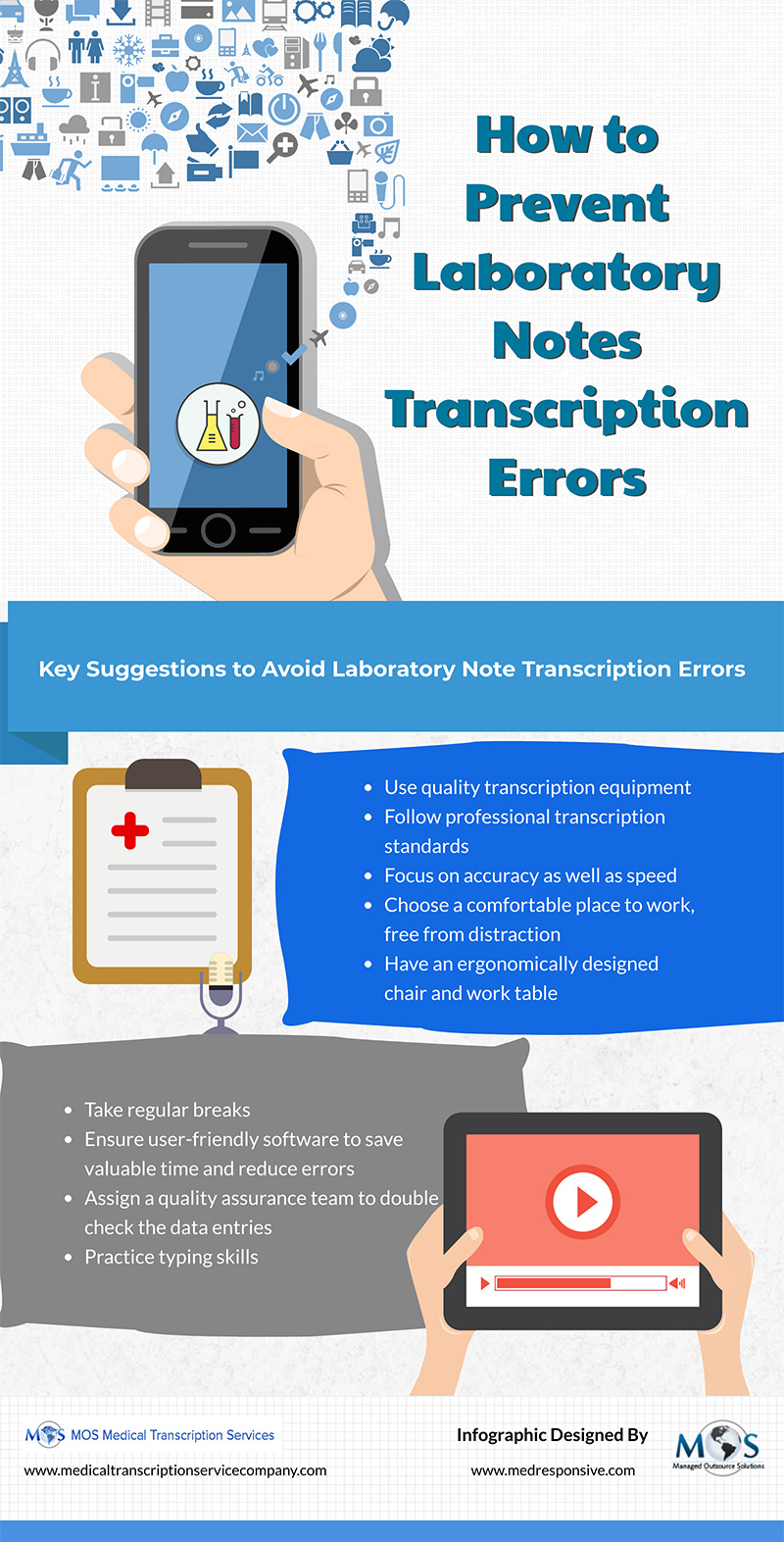
To ensure accurate and complete clinical documentation, many healthcare facilities rely on experienced medical transcription companies that provide EHR/EMR integrated transcription services. Laboratory notes are an important component of medical records. They include crucial details such as the experimental plans, observations, discussion of results and more. When entering words and sentences in a laboratory note, transcription errors such as incorrect test entry, incorrect spellings, repeat typing, wrong time or dates specified etc. can occur.
The International Journal of Health Care Quality Assurance has discussed Six Sigma tools to help identify and solve laboratory data entry quality problems. These QI tools include steps such as – Define, Measure, Analyze, Improve and Control (DMAIC). This Six Sigma DMAIC method is reported to reduce data entry errors considerably.
In the world of healthcare, speed, efficiency and accuracy are paramount. But a recent study by the American Medical Association found that physicians spend nearly half of their workday on EHR documentation. This can significantly affect the time spent on patient care.
Medical dictation software is a valuable tool for time-strapped physicians. With extremely packed schedules, long work hours, and numerous patient appointments and administrative tasks to juggle, physicians have limited time available during the workday. Medical dictation software is a useful tool in this situation that listens to their patient consultations, and automatically takes notes on the user’s mobile, laptop or workstation. There is a wide range of medical dictation software tools that work on all EHR platforms. Nevertheless, medical transcription services continue to be relevant to review and improve the accuracy of speech recognition generated documents.
Take your documentation to the next level with our professional medical transcription services!
Medical dictation software uses a microphone to record voice and instantly translates what it hears. It eliminates typing, saves time on clinical notes, improves productivity, and can be accessed from anywhere and reused. AI-powered medical scribes recognize spoken words, phrases and keywords and convert them into legible text in real time. It takes the stress out of documentation and frees up the physician to focus on the patient. These tools generate clinical documentation that can be integrated into the electronic health record (EHR). However, to experience the full benefits of the technology, it’s important to use it effectively.
Tips to Maximize the Potential of Medical Dictation Software
Choose the Right Software
Different medical practices have different requirements, which can range from compatibility with specific EHR systems and support for multiple languages, to advanced editing capabilities. Start by assessing your needs and determine what features are most important for your practice. Modern speech to text software comes with a wide range of functionalities. A popular option, Dragon Medical One offers highly accurate real-time medical speech recognition, customizable vocabularies and templates, and cloud-based for accessibility across devices. Otter.ai, another advanced medical dictation tool, comes with a user-friendly interface, supports collaboration with sharing and editing features, and integrates with Zoom and other conferencing tools. Google Docs Voice Typing supports multiple languages. Nuance Dragon Professional Individual, Mobius Scribe, Microsoft Dictate, and Speechmatics are other top medical dictation options.
Research and compare these options. User reviews, demos, and consultation with colleagues can help you find the best product for your needs.
Invest in Quality Hardware
Dictation software can ensure accurate note-taking only if the audio input is good. Invest in a high-quality microphone that minimizes background noise and captures your voice clearly. Additionally, make sure that your computer and mobile device is compatible with the dictation software. Check for system requirements and compatibility with your existing EHR systems.
Choose a Quiet Environment
Minimize background noise before you begin dictation. Background noise can interfere with the software’s ability to accurately transcribe your speech. Dictating in a quiet environment can help the software adapt better to your voice and background noise levels, improving accuracy over time.
Understand How the Tool Works
Advanced apps make your mobile device a microphone that can dictate directly into any software on any computer and uses deep learning and neural net technology to adapt to your voice patterns. As your license learns your voice pattern and nuances, it is completely customized to you.
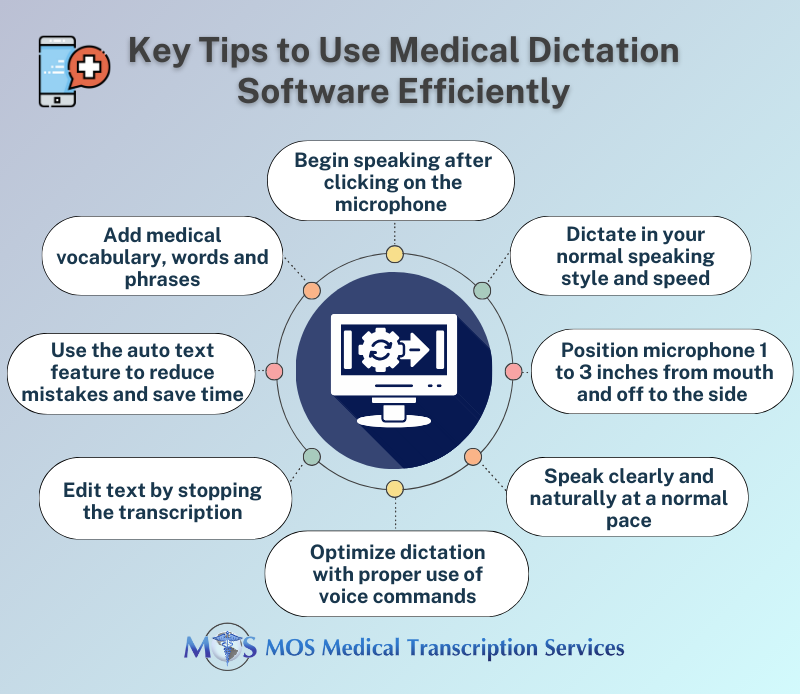
Starting dictation and transcription is easy. Open the software and turn on the microphone. Then place the cursor in the place you want text to be inserted and begin speaking in your normal speaking style and speed. On Dragon Medical One, you can speak through the headset attached to the clinical workstation, or use your smartphone by installing the PowerMic Mobile app on your mobile device. Dragon listens to you speak and uses AI to transcribe the words on your behalf. Once you’ve finished your dictation, log out of the app.
Position the Microphone Correctly
In sound-sensitive apps, even minor changes in mic position can make a big difference in volume and amount of sounds that get transmitted. When using a headset, the microphone element should be positioned between 3/4 inch to 1 inch away from your mouth. For a hand-held microphone, the proper distance is typically 2-3 inches from your mouth. The appropriate range for a desktop microphone depends on the specific design, but most require a distance of 3-5 inches between your mouth and the microphone element. With Dragon Medical One, it is recommended that the microphone on your phone is about 1 to 3 inches from your mouth and off to the side (hopkinsmedicine.org). Press and hold the microphone button for a half-second before talking. Speak directly into the microphone, not across it. For SpeechWare “TableMike” models, the recommended mouth-to-mic distance can range from about 10 to 24 inches.
Optimize Accuracy
Optimizing accuracy with speech recognition is in your hands. Here are the things you can do to ensure accurate note-taking:
Speak clearly and at a moderate pace. Avoid mumbling or speaking too quickly, as this can lead to transcription errors.
Speak with a normal or conversational volume, that is, don’t speak too loudly or softly.
Think before you dictate and use phrases or complete sentences.
Avoid mumbling. Speak slowly and distinctly – this is the most important thing when it comes to accuracy.
Use Voice Commands Correctly
Apps allow you to dictate commands and punctuation to tell your PC what to do and save time In some apps like Mobius Scribe, numbers are given as words (not digits), unless dictated together with dates, date ranges, times, measurements, dosages, and symbols. Learn to use dictation commands:
Ask for a list of commands
Pause briefly after a command to ensure that it is interpreted as a command and not processed as text
Say the words “colon,” “new paragraph” or “end sentence”, delete that, “select all”, etc.
Say “cap” to capitalize a word, or “all caps” to capitalize all letters in the following word
To provide a number in digits, say “numeral” followed by the number
Dictate symbols – say “plus sign” for +, “percent” for %, etc.
Use commands to type, hold, and hit keys on your keyboard.
Ensure Consistent Use of Terms
Use consistent medical terminology and phrases. This helps the software learn and adapt to your specific language patterns, increasing accuracy. Many dictation software solutions allow you to add custom vocabulary, including medical jargon, patient names, and frequently used phrases. Regularly update and refine your custom vocabulary for better accuracy. Leverage templates and macros to quickly insert common phrases or structures into your documentation. This can save time and minimize repetitive dictation.
Proofread and Edit
While medical dictation software is highly accurate, it’s not infallible. Best practice is to review the transcriptions for errors. In fact, many healthcare providers outsource this task to a medical transcription company in the US, Having your AI-generated transcripts proofread by experienced human medical transcriptionists will ensure that your documentation is precise and free from mistakes. Many software applications can be trained to correct mistakes. This ongoing learning process allows the software to continuously improve its accuracy over time.
Create Auto Text
The auto text feature allows you to automatically create specific text for frequently used language, which can reduce mistakes and save time. Auto texts are used for normal patient status notes, signatures, and frequently typed addresses. On Dragon Medical, open the Auto-text window through the context menu or the “manage auto-texts” command. Then click+ and add a new entry and fill in the material that you want to appear when you say a specific word. Hit apply all and close.
Add Medical Vocabulary, Words and Phrases
All leading medical dictation systems understand medical vocabulary. However, you may come across words that the software doesn’t spell correctly the first time. In such situations, you can teach your app new medical vocabulary, words and phrases. For instance, to update your dictation vocabulary in the Mobius Conveyor medical dictation solution, follow these steps: Go to Vocabulary by swiping left from the live screen, tap the “Add vocab” button, and type the new term you want to add under “Written Form”. You can check if the app will get it right by tapping the “try it out box” below and speaking a sentence with the new word.
Stay Updated
To benefit from the latest features and improvements, regularly update your dictation software. Updates typically include enhancements to accuracy, security, and compatibility. Many providers offer resources, tutorials, and support to help you make the most of their product. Stay informed about these new tips and best practices for using your specific dictation software.
Outsource the Proofreading Process
Medical dictation software can be a powerful tool for healthcare professionals, streamlining the documentation process and improving accuracy. It may take some time to learn and get used to all the features of medical dictation software, but once that’s done, you will be rewarded with real-time, quality transcription without having to do any typing. Today, busy physicians who use speech recognition software can boost documentation accuracy by relying on a HIPAA compliant medical transcription company for proofreading and quality assurance checks.
Partner with our medical transcription company to boost efficiency and accuracy!
Laboratory notes include crucial details that are used to write laboratory reports. These notes include observations of experiments and collected data points and the reports must be error free to help physicians reach the right diagnosis and treatment decisions. An experienced medical transcription company can provide EHR/EMR integrated transcription services to ensure accuracy and completeness in clinical documentation.
The common transcription errors encountered when entering words and sentences in a laboratory note include
hitting the wrong key
incorrect test entry
typing incorrect spellings
priority entered incorrectly
leaving out important details
wrong time or dates specified
missing venipuncture charges or
repeat typing
Manual data entry process can produce many errors, which can have a significant effect on other laboratory sections, clinical care, and ultimately, patients.
Six Sigma QI Tools to Improve Laboratory Data Entry Quality
A July 2013 article in the International Journal of Health Care Quality Assurance discusses Six Sigma tools that helped the Six Sigma Quality Improvement (QI) project team define project goals, measure data entry errors to assess current performance, analyze data and determine data-entry error root causes. These tools assisted the team in implementing changes and control measures to address the root causes and to maintain improvements. Six Sigma is a systematic five-step process to help identify and solve problems: Define, Measure, Analyze, Improve and Control (DMAIC).
1. Define the Problem
To properly define the problem, three effective tools can be used –
1. Answering the quality-related critical questions
2. Customer Voice (VoC) to better understand the laboratory customers’ views and needs to focus on meeting their expectations
3. Data Entry Process Mapping, which is a workflow diagram that helps to clearly understand the process.
Mapping is a helpful tool prior for any process improvement and to achieve efficiency. Analyzing the data entry steps helps understand the process and develop improvements by eliminating unnecessary tasks, clarifying roles, reducing unnecessary delays and eliminating duplication.
2. Measure the Process
In this stage, the performance of the data entry process is assessed. The data is reviewed data and additional indicators to measure are identified. Here, the team can measure concerns such as – what problems need addressing, when the problem occurs, who needs to be involved, what is the business significance of solving the problem and What is the desired Process Improvement (PI) outcome. Unclear forms pose a major problem, as extra time would be required to clarify information. Error frequency can also vary depending on the individual’s data entry skills.
3. Analyze Data
The main purpose in this stage is to analyze the root causes of problems identified in the measurement stage. Here, the team can work to identify variations, gaps between current performance and customer expectations and then decide significant root causes they need to focus for improvements.
4. Improve the Process
In the Improve stage, the team can aim at designing creative solutions to fix the root causes that were identified after measuring and analyzing the data. They can work to minimize or eliminate data entry errors by creating innovative solutions using existing technology and simple process redesign. An implementation plan can be put in to effect to implement changes and monitor data entry errors.
5. Control the Changed Process
In the final stage, the team can create quality management tools to help manage the improvements, keep the process going, and prevent errors. They can develop and implement a monitoring plan to track all data entry errors, inform staff of monthly quality-indicator progress reports, create and share tips and best practices among staff, encourage laboratory staff to learn data entry, and complete competency evaluation.
The team has reported that after applying the Six Sigma DMAIC method, significant improvements in staff morale, operational and financial outcomes were realized and data entry errors were reduced considerably. In clinical laboratories, the opportunity for successfully implementing Six Sigma is greater than in many healthcare areas. These tools were used to target root causes in the laboratory process.
Other suggestions to avoid data entry errors –
Focus on accuracy as well as speed
Take regular breaks, as data entry over extended periods can get monotonous
Choose in a comfortable place to work in that is free from distractions
Make sure to have an ergonomically designed chair and work table
Adopt user-friendly software to save valuable time and reduce errors
Assign a quality assurance team to double check the data entries
Ensuring accurate data entry is a critical task for any laboratory. Practices can rely on pathology transcription services to get quality transcripts of diagnostics reports, specimen diagnosis, doctor’s notes, forensic pathology reports, and more.
Many physicians find electronic health record (EHR) documentation tedious as it involves too much time doing data entry which takes away from direct eye contact with patients. Physicians need to document each patient interaction correctly and as soon as possible to maintain the integrity of the record. Medical transcription outsourcing is a feasible strategy to create accurate, integrated and complete digital patient medical records from your notes. Here are some useful strategies you can consider reduce your work load and save time on EHR documentation, including strategies recommended by the American Academy of Family Physicians (AAFP).
Rearrange your Exam Room: The computer should be positioned in a way that allows you to see both the patient and the screen with just a minimal shift in gaze. The aim should be to avoid any position where you have your back to the patient, as if you do, you could miss crucial nonverbal clues, besides straining your neck! A computer or monitor that swivels or a wireless medical computer workstation on wheels are popular options user-friendly, ergonomic options.
Use Two Screens for Televisits: For a telemedicine setup, the AAFP recommends two screens – one that shows the patient and another for EHR documentation. You should be able to see the patient and the digital medical record with just a slight shift of your gaze. Consider a tablet to communicate with the patient and a desktop or laptop for EHR display.
Leverage EHR Capabilities and Hacks: EHR templates are designed to promote structured and efficient documentation of care and eliminate the need to type out words or phrases.
Use templates for physicals, routine office visits, televisits, procedures, patient instructions, specific exams and health parameters. Insert the automatic list of the patient’s diagnoses and related orders in the template into the assessment/plan and type in only the remaining few details.
Automatically extract problems and diagnoses from assessments and plans, instead of repeatedly documenting each problem.
For questions that have options that are short responses that do not need lengthy answers or elaboration, use the form fields or checkboxes. This can help minimize errors, improve understandability, and save time on documentation.
EHRs also feature shortcuts called smart phrases or dot phrases that save physician time. Learning how to use EHR templates and smart phrases can help you capture the key elements of the visit with minimal effort. Dot phrases can help with proper documentation of common procedures and office visits, manage your inbox, and much more. However, while using these well-rounded phrases, make sure that the action noted in the smart phrase is actually performed.
Stick to Short Notes: In order to meet billing requirements, physicians tend to write excessively long notes in the EHR, which is not only time consuming, but also leads to “note bloat”. Avoid long notes when documenting the history of present illness (HPI). Document the medical visit clearly using short phrases to identify each complaint. Ensure that you use semi-colons to separate each phrase. Use two spaces and another line to document a separate complaint.
Use Online Patient Questionnaires to Collect Data: Use questionnaires to collect information from patients for common situations, medical history, current medications, and review of systems. This can save time that would go into asking patients questions during the consult.
Train your Dictation Software to Increase Accuracy: Dictation systems may misrecognize certain words or commands during your dictation. Make your dictation software more accurate and precise by training it on the correct pronunciation of specific words and commands. You can even train the software to recognize voice commands to add templates.
Use Copy-paste to Streamline Patient Education: A lot has been said about the time-saving copy-paste function in the EHR and how it can lead to errors that have legal consequences. However, copy and paste feature can be used safely to streamline patient education. Copy paste relevant information from the treatment plan into the patient instructions and save time on typing out the details. Leveraging audio or video patient education materials during the visit can also save time.
Other strategies experts (link.springer.com) suggest to improve the efficiency of EHR documentation include:
Develop novel ways to update standing lists, so that useless information is removed automatically.
Include anticipatory guidance in automated recommendations so that the system gets things done before the user does it.
Try to group related information together.
Make it easy to find information with a record
Use techniques that can reduce the number of clicks, including keyboard shortcuts, and make touchscreens available for selected functions.
The AAFP recommends using scribe or team documentation to save time on EHR tasks. Today many primary care practices rely on family practice medical transcription companies for EHR documentation support and also to review prior notes and ensure they are accurate, complete, and free of grammatical errors and typos.
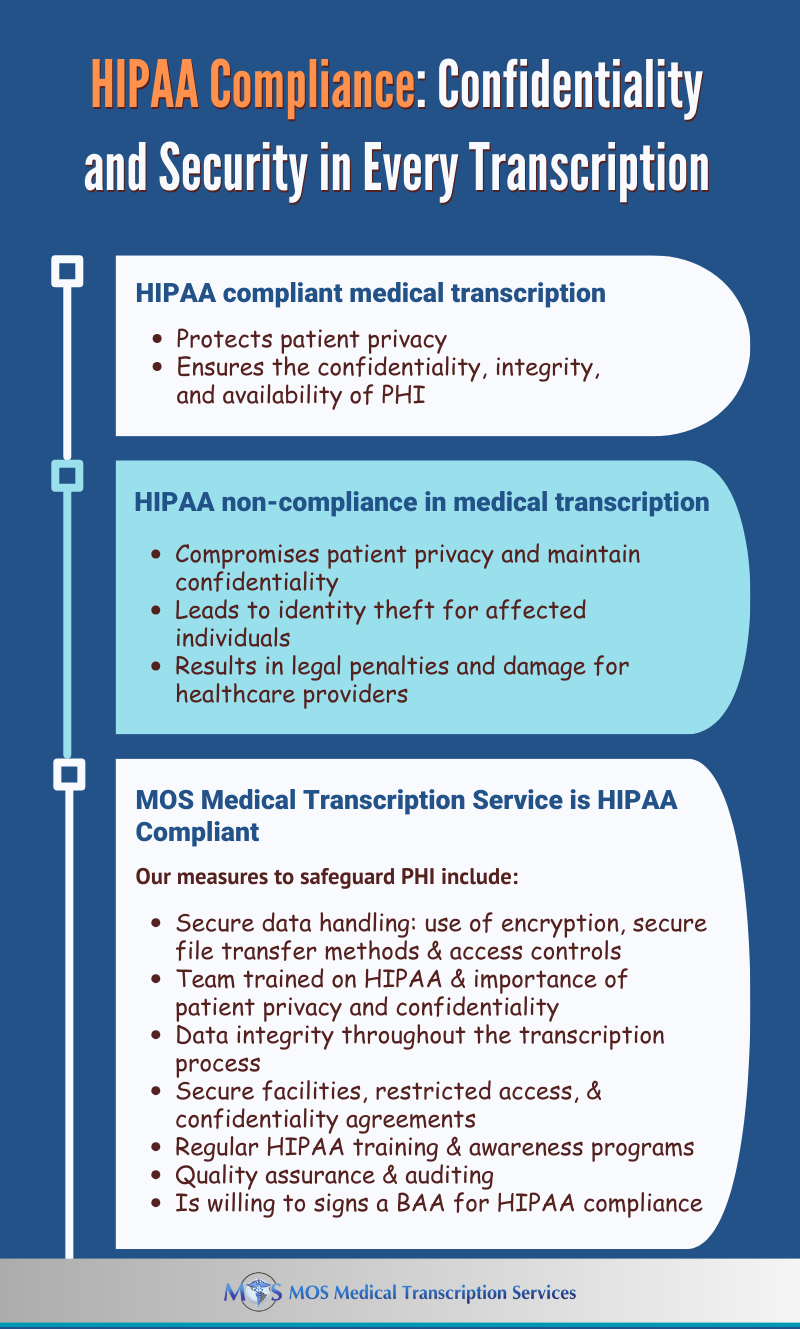
The Health Insurance Portability and Accountability Act (HIPAA) establishes the standard for protecting sensitive patient data or the confidential use of protected health information (PHI). “Covered entities” or “business associates” that handle PHI are required to be HIPAA-compliant. Covered entities refer to health plans, health care clearinghouses, and health care providers. Business associates mean all organizations or individuals who act as a vendor or subcontractor with access to PHI. A US based Medical transcription company comes under the business associate category and can be held liable for PHI exposure. That’s why you need to strictly enforce HIPAA transcription confidentiality regulations.
Trust us with your sensitive medical data – we are HIPAA compliant!
What HIPAA Compliance Means for a Medical Transcription Company
HSS.gov defines a “business associate” as a person or entity that performs certain functions or activities that involve the use or disclosure of protected health information on behalf of, or provides services to, a covered entity. As a business associate, a medical transcription company has to provide a written assurance or sign a contract with the covered entity or healthcare provider that it will appropriately safeguard patient identifying information. This means that the company must have the necessary infrastructure and regulations in place for securing and maintaining the confidentiality of PHI.
The HIPAA regulations that apply to a medical transcription company are as follows:
The company must ensure that the confidentiality, integrity, and availability of all PHI handled or transmitted is preserved.
It should not use or further disclose the information other than as permitted or required by the contract or as required by law.
It should implement appropriate safeguards to prevent reasonably anticipated but unauthorized use or disclosure of the information, including implementing requirements of the HIPAA Security Rule with regard to PHI.
The company must protect PHI it handles against reasonably anticipated threats to the security or integrity of the information.
It should ensure workplace compliance.
In 2022, an average of 1.94 healthcare data breaches of 500 or more records were reported each day (HIPAA Journal)
Measures for HIPAA Compliance
A HIPAA compliant medical transcription company will have proper measures in place to ensure security, health care compliance and privacy of PHI. Achieving HIPAA transcription compliance means your company has to maintain and implement effective written policies and procedures as well as implement administrative, physical and technical safeguards and controls to protect PHI:
Physical and Technical Safeguards
HIPAA compliant medical transcription means have the necessary physical and technical safeguards in place to protect PHI. This includes:
Measures to restrict physical access to computers and the facility or facilities in which they are housed, while ensuring properly authorized access is allowed.
Password protection for all computers and portable devices
Policies to secure PHI with specific controls such as strong passwords, email encryption, intrusion prevention software, locking down USB ports, etc.
Policies to protect the facility and equipment from unauthorized physical access, tampering, and theft.
Physical safeguards for all workstations that access PHI to restrict access to authorized users.
Procedures to create and maintain retrievable exact copies of EPHI.
Policies for guarding against and detecting malicious software.
Measures to report and address security incidents.
Policies and procedures for responding to an emergency or other occurrence, such as fire, vandalism, system failure, or natural disaster that harms systems that contain PHI.
Device and media controls for the receipt and removal of hardware and electronic media that contain PHI into and out of a facility, and the transfer of these items within the facility.
Technical security measures to guard against unauthorized access to PHI being transmitted over the internet.
Confidential patient information whenever appropriate.
Employee Training
Employees need to sign confidentiality agreements and be educated on the following:
Overall policies and practices to protect the security of electronic PHI in accordance with HIPAA rules
Responsibilities in protecting PHI, identifying HIPAA violations, handling sensitive data, password security, threat recognition, breach prevention strategies, and necessary documentation for mitigating breaches
Avoiding violations in social media use, public discussions of patient information, and accessing data on personal devices
Importance of regular annual training to keep up-to-date with the latest requirements
It is also essential to maintain documentation clearly listing the roles and responsibilities of all staff involved. HIPAA documentation provides evidence of the security measures taken to protect the confidentiality of patient information. Audits
In addition to strictly implementing HIPAA confidentiality agreements, reliable medical transcription companies conduct annual audits to assess their administrative, technical, and physical measures. This helps identify potential vulnerabilities that can compromise the integrity and confidentiality of PHI. Measures can then be taken to minimize the risks.
HIPAA Compliant Medical Transcription: Safeguard Against Breaches
Earlier this year, a cyberattack on a U.S. medical transcription service resulted in the theft of highly sensitive personal and health information from nearly nine million patients, marking one of the most severe medical data breaches in recent history (TedCrunch). What are the consequences of such breaches?
The stolen data poses a range of risks, including personal distress, identity theft, and reputational damage for affected individuals. Additionally, cybercriminals can exploit compromised accounts to breach enterprise networks, causing potential corporate harm.
For healthcare organizations, such breaches lead to severe consequences. Beyond reputation damage, they face substantial financial losses due to investigative expenses and potential legal repercussions.
Maintaining patient privacy and confidentiality is a matter of medical ethics, fostering trust between patients, healthcare providers, and transcription companies, all of which is fundamental for quality care.
Healthcare providers need to their research well and choose a US based medical transcription services that can provide accurate and timely EHR documentation, and also ensure the confidentiality of PHI with strict measures for HIPAA compliance.
Learn more about our HIPAA compliant medical transcription services
Maintaining appropriate records of psychological services allows providers to monitor their work and promotes continuity of care. Good records protect both the patient and psychologist in the event of legal proceedings and are also essential for the psychologist to obtain appropriate reimbursement for services rendered. Psychiatry transcription service providers play a key role in helping mental health specialists ensure accurate and timely record keeping.
Mental health progress notes are the notes that psychologists, therapists, clinical counselors, psychiatrists, and other practitioners make at each session about the patient’s clinical status and may include important issues or concerns associated with the patient’s treatment over the course of care.
Functions of Mental Health Progress Notes
The functions of mental health progress notes include the following:
Provide Evidence that Competent Care was Provided: Progress notes allow a therapist to document their ongoing efforts to assess and manage the patient’s symptoms and also document their how they exercise judgment when dealing with complex and challenging treatment scenarios.
Demonstrate Medical Necessity: Insurers may require a provider to document the “medical necessity” for treatment in the patient’s record. Progress notes contain evidence of the patient’s need for treatment at a particular point in time.
Treatment Planning: It can happen that the patient is seeing the therapist again after an extended period of time. Progress notes serve to refresh the therapist’s memory. Different therapists treating the patient during a treatment episode refer to progress notes for specific clinical information pertaining to the patient.
Legal and Ethical Considerations: While there are no specific legal or ethical standards that govern the format or content of a progress note, as a general rule, therapists need to take practical steps to ensure accurate documentation that reflects the care provided.
Payer Requirements: Insurance companies or managed care organizations may have explicit practice guidelines and/or treatment standards with specific requirements for documentation of mental health services, including progress note entries.
Therapists use different formats and approaches to write progress notes, depending on the particular situation. For instance, while some clinicians keep detailed notes, others prefer to record only essential information. Many follow the S.O.A.P. format:
Subjective – The patient’s description of the problem/intervention
Objective – The therapist’s objective observations
Assessment – The therapist’s analysis of the various components in the subjective and objective sections of the note
Plan – A description of the treatment plan to the reach the goals or objectives (including additional tests to rule out or confirm a diagnosis, prescribed medication or surgical interventions, and follow-up)
However, some therapists may find the S.O.A.P. format cumbersome. The American Psychological Association (APA) states that up to the psychologist to balance various considerations and adopt the appropriate approach to keeping records.
Writing Therapy Progress Notes – Important Considerations
Here are 6 important steps to follow to maintain good mental therapy notes:
Meet the Necessary Requirements: Mental health progress notes need to meet their basic purpose and functions as defined above. The notes need to comply with state and federal laws and meet payer regulations. The documentation should provide evidence of quality care and decision-making for complex situations. The progress notes should provide communicate treatment plan information between providers, while meeting the specific requirements of the practice setting. Therapy progress notes may include: medical history, current condition, allergies, medications used and prescriptions, past treatment, diagnosis, symptoms, current treatment plan and modifications, interventions, progress or lack of progress, tests conducted and results, safety issues, treatment compliance/lack of compliance, collaboration with other providers, referrals made and reasons, and so on. To ensure the right level of detail, the APA recommends that psychologists balance client care with legal and ethical requirements and risks.
Be Clear, Legible and Specific: Mental health progress notes should be clear and legible and readable by other providers and authorized persons. Entries should be accurate and if possible made soon after services are provided. The documentation should be concise and specific, and cover all the information to justify medical necessity and the treatment approach.
Know HIPAA’s Distinction between Progress Notes and Psychotherapy Notes: Therapists who are HIPAA-covered entities should be knowledgeable about the concept of “Psychotherapy Notes” according to HIPAA. The HIPAA-created “Psychotherapy Notes” category is different from progress notes. According to HIPAA, Psychotherapy Notes exclude: “medication prescription and monitoring, counseling session start and stop times, the modalities and frequencies of treatment furnished, results of clinical tests, and any summary of the following items: Diagnosis, functional status, the treatment plan, symptoms, prognosis, and progress to date”. This implies that HIPAA clearly excludes content that is ordinarily used to document the patient’s treatment, e.g., the content that is ordinarily noted in progress note (www.camft.org).
Be Knowledgeable about Terminology and have a Ready List of Frequently-provided Interventions: Progress note-taking involves documenting interventions and treatments. Knowing the terminology, appropriate language to use, and abbreviations is essential for better understanding and reliable reference. In fact, teams in a medical transcription company that provides psychiatry transcription services would be familiar with appropriate language and abbreviations used by therapists, and can ensure quick, error-free documentation of physician notes in the electronic health record (EHR). Mental healthcare software provider Quenza recommends that having a ready list of common interventions for quick reference would be very for practitioners involved in the patient’s care to understand the interventions implemented by others.
Avoid Shortcuts: Every time a progress note is created, it should include all the necessary information: the clinician’s full name, date, time, patient name, patient identifier and electronic signature. This is strongly recommended for legal and ethical reasons, especially in a multi-provider context.
Consider Patient Requests: Some patients ask their therapist to minimize documentation in the record in order to protect the information from certain parties or to avoid potential legal problems. In such situations, clinicians should maintain a balance between meeting documentation requirements and safeguarding the patient’s interests by separating discussions with patients from the rest of the medical record (www.therapynotes.com).
When maintaining mental health records, clinicians need to consider legal requirements, ethical standards, patient needs and other factors, as well as their particular professional context. Outsourcing medical transcription to an experienced psychiatry transcription service provider can help providers maintain accurate and timely progress notes as well as psychotherapy notes.